
Comcast Cable Communications, LLC, doing business as Xfinity, is a telecommunications company and division of Comcast Corporation used to market consumer cable television, internet, telephone, and wireless services provided by the company.

Comcast is the largest provider of cable internet access in the United States, servicing 40% of the market in 2011. As of July 26, 2018, Comcast has 26.5 million high-speed internet customers. Comcast began offering internet services in late 1996, when it helped found the @Home Network, which sold internet service through Comcast’s cable lines. The agreement continued after @Home’s merger with Excite. When the combined company Excite@Home filed for bankruptcy in 2002, Comcast moved their roughly 950,000 internet customers completely onto their own network.
Help Desk Number: 1-833-520-0849
Once Dialed, you will be prompted to enter this PIN: 97246
Upon reaching a live agent, provide Pin 97246 when requested
This number is for your support only, do not share with any Customers
Customer Service Number: 1-800-XFINITY (800-934-6489))
Recent Updates
- Xfinity 12/10 Product Strategy ChangesXfinity 12/10 Product Strategy Changes
- Comcast Helpdesk Flow UpdateComcast Helpdesk Flow Update Effective August 22, Xfinity’s Agent support call center will no longer support PIN changes for customers. When a customer wants to transfer their existing […]
- Xfinity – Worklisted OrdersXfinity – Worklisted Orders The NEW Update is: Worklisted Orders New Update: Always share the Xfinity Support number listed on the OCN Page. Customers will now […]
- Xfinity Help Desk New NumberXfinity Help Desk number has been changed and we need to follow the following process in order to get connected with Help Desk.
- Xfinity- Order Processing GuidelinesXfinity Stream Saver: Xfinity Stream Saver is an add on and it is not a replacement for Video since it is not in the offer name. […]
- Xfinity- Pricing UpdateTeam, Xfinity has updated their internet pricing which went into effect today, 4/15/2025. What’s included in this update?
- Xfinity- Order Processing Guidelines – Choice TV + InternetXfinity Stream Saver: Xfinity Stream Saver is an add on and it is not a replacement for Video since it is not in the offer name. […]
- Xfinity- Transfer/Upgrade Services process ExplainedTeam, For Xfinity transfer customers, after linking out from BD (Flecx), Agents are required to click on the ‘Transfer/Upgrade services’ hyperlink option. They will receive a […]
- Xfinity- Updater | Comcast Home Security Training MaterialsTeam, Please find below training materials for Comcast Home Security.
- Xfinity- Triple play ProtocolOn such Xfinity calls where the agents have to process two orders (One for a bundle with cable and internet and one for the landline), if […]
Stay connected and protected with Xfinity Internet
Save on reliable internet with a powerful, secure connection that helps keep your loved ones and devices safe online.
Services and Lines of Businesses Offered
- TV
- Internet |
- TV | How to get Channel Lineup
- Internet | Xfinity Internet delivers superfast speeds to the most homes. Now it comes with 1.2 Terabytes (1,229 GB) of Internet Data per month.
The 1.2 TB data plan is currently not applicable to Northeast markets, including the following states: CT, DE, MA, MD, ME, NH, NJ, NY, PA, VA, VT, WV, the District of Columbia, and parts of NC and OH. (More Info)
- Phone
- Home Automation System
Customer Base (Residential Only)
- New
- Existing (Please do not create a new order for customers who have placed an order already and are waiting for installation)
- Do not select existing on console / bundledealer. Simply link out to the CCUI buy flow and once the address is populated with the packages there will be a small link on top to upgrade services.
Transfers & Moving:
Business as usual. Follow the buy flow. Call help desk in case of issues.
Flex TV & Streaming Service
Comcast will normally push Flex TV when users are signing up for Internet only and want to use Flex for streaming Netflix, Hulu, ect. Do not dispose Flex TV as an RGU. If it is bundled with another service then that can be claimed but not the Flex TV itself.
For the “Customer Owned Streaming Device”, the customer would not be able to stream Xfinity TV packages through their own streaming device.
They would need to use an X1 TV Box or Flex TV to stream popular, or any, TV packages.
In case of Flex TV we will not be claiming TV as a sale or line of business.
Prepaid Customers wanting regular internet:
We should be able to use the transfer/upgrade services option or even place a new order provided they are not in a contract, in case they are moving. If they are staying at the same address, since they already have internet, we cannot sell them internet.
Cool Off Period & Promotions
There no cool off period. We will follow the Buy Flow for the promotions. In case of a contract we need to disclose the terms & duration of the contract, along with the termination charge ETF. Home Security will always have a contract with an ETF fee (check package description).
Credit Check
Soft Credit Check
Shipping and Handling
Shipping of your Getting Started kit can take three to five days for standard shipping and one to two days for expedited shipping (excludes Sunday). You can activate your Getting Started kit by app, online or on your TV.
How does the Buy Flow Work
- Always confirm if it’s commercial or residential address as we are only going to serve residential address for orders.
- Do not use any special characters at all in the apartment field
- CS Number: 1-800-XFINITY


J Lodge Verification Process
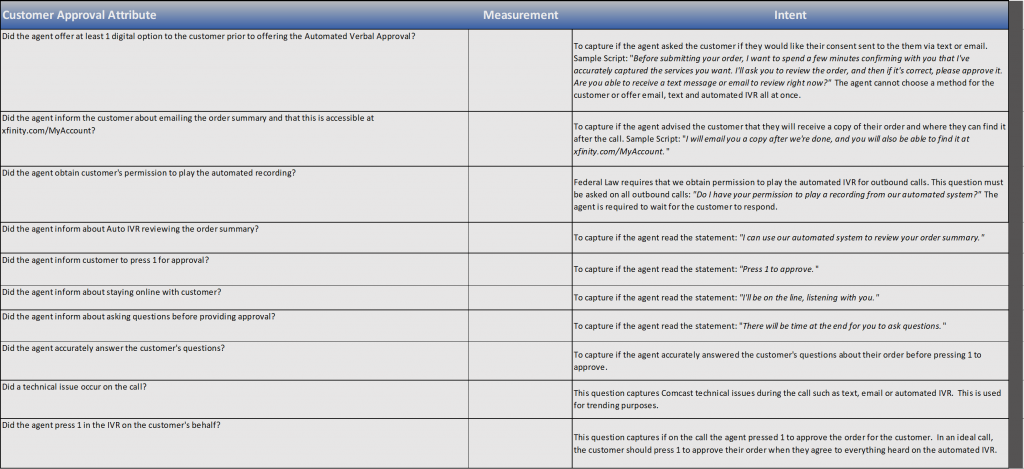
After completing the initial steps of the order when we move forward customer will receive an email / SMS that contains a link customer must click, review order and approve it so that the agent can proceed with order placement via CCUI. IVR option should be the last option offered to customer.